

Service organizations with field staff require structured processes for planning, recording, and analyzing working hours so that assignments can be transparently documented and resources can be realistically scheduled. Work time management forms the foundation for reliable assignment coordination, as available working hours, travel times, and project-related activities are systematically recorded and analyzed. For technical service processes, this data foundation provides a robust basis for scheduling, capacity utilization analyses, and downstream billing processes.
Definition: What is work time management?
Work time management refers to the organizational control and documentation of working hours within a company. This includes the structured recording of start and end times, breaks, and other time categories in the daily work routine. This information forms the basis for the scheduling of tasks and human resources.
Companies use work time management to document working hours in a traceable manner and to present operational workflows transparently. Time data can be assigned to individual activities and subsequently used for internal analyses or administrative processes.
In technical service organizations, work time management also supports the scheduling of service calls and field service tasks. This makes it clear when work was performed and how working hours are distributed within a service call or project.
What are the goals of work time management?
Companies pursue several organizational and operational goals with work time management. The focus is on transparency regarding working hours, predictable capacities, and traceable documentation of the work performed. Structured time data supports both operational workflows and administrative processes such as payroll or workforce planning.
The most important goals can be summarized as follows:
- Transparent time tracking: Working hours are systematically documented. This allows the start and end of work, as well as assignment times, to be clearly traced.
- Compliance with legal requirements: Companies meet the requirements for working time recording. This includes the complete documentation of daily working hours.
- Predictable staff capacities: Available working hours and absences become visible. This information supports the planning of projects, service assignments, or shifts.
- Basis for billing and analysis: Recorded times can be assigned to projects, customers, or service orders. This provides reliable data for billing, controlling, and reporting.
- Transparency for managers and the organization: Work time data provides insight into workload, overtime, or assignment times. This information supports decisions regarding workforce planning and the design of work time models.
Work Time Management: Key Tasks in Organizations
In day-to-day operations, work time management involves several organizational tasks that enable structured planning and documentation of work hours. These tasks provide an overview of working hours, capacity, and timelines within teams and projects:
- Planning of working hours and personnel capacities
- Documentation of start and end times and breaks
- Recording of field service hours
- Assignment of working hours to projects or service orders
- Accounting for work schedule models and absences
- Verification of working time regulations
- Analysis of time data for planning and organization
These tasks create a reliable foundation for managing working hours and human resources within the company. Structured time data supports internal processes and facilitates the further processing of information in downstream systems.
Work Time Management for Predictable Service Processes
Structured time data provides clarity regarding capacity, service call durations, and working hours. Innosoft helps service organizations clearly document working hours and track service calls in a transparent manner.
Work Schedule Models in the Workplace – Models for Different Work Schedules
Work schedule models determine how working hours are distributed and organized within a company. They establish the time-related framework for employees and thus form the basis for work schedule management. Different models take into account operational requirements as well as legal regulations and individual work schedules.
Common working time models include:
- Full-time model with fixed weekly working hours
- Part-time model with reduced working hours
- Shift model with rotating work schedules
- Flexible working hours model with flexible start and end times
- Working time accounts for recording overtime
- On-call duty in technical service
What role does work time management play in field service?
In technical field service, work time management takes into account various activities within a service call. Especially in digital service in mechanical engineering, work hours related to maintenance, repairs, or plant service must be documented in a traceable manner. These times are documented in a structured way so that service calls and work hours remain traceable. Field Service Management systems such as Innosoft support the digital recording of working hours directly within the service order. Technicians document the start, duration, and completion of an order on the go. This allows working hours to be clearly assigned to a specific assignment, project, or customer.
At the same time, this time data provides a basis for scheduling in the service department. Dispatch and service management can identify available capacities and schedule technicians accordingly. In this way, the timeline of service calls remains transparent and traceable.
Work Time Management in Field Service – Time Types in Technical Service
In technical service, work time management encompasses several time types that are documented during a workday. Service technicians frequently switch between different tasks and locations. A clear distinction between the individual time types ensures transparent service processes and a traceable allocation of working hours to service calls.
Typical time types in technical field service are:
- Working time at the customer’s site, such as maintenance, repair, or installation work directly at the job site
- Travel time between job sites, such as trips from the starting point to the customer or between multiple service calls
- Setup and preparation times such as preparing tools, spare parts, or technical documentation
- Break times during the workday such as legally mandated rest periods during a service call
- On-call times in technical service such as times spent on standby for short-notice service orders
- Emergency and breakdown calls such as unplanned calls outside of regular service scheduling

Master Data in Time Management: The Foundation for Planning and Analysis
Structured master data in time management determines how working hours are recorded, evaluated, and assigned to individual service assignments. Especially in technical field service, stored information provides a clear foundation for planning, documentation, and subsequent analysis. Key areas of master data can be divided into several categories:
- Employee Master Data: Information on qualifications, work schedules, or service regions defines which technicians are available for specific jobs and under what time constraints assignments can be planned.
- Time Types and Surcharge Rules: Defined categories such as time spent at the customer’s site, travel time, or setup time ensure a clear assignment of activities. Supplementary rules specify when surcharges apply for overtime, night work, or on-call duty.
- Calendar data: Regional holidays, vacation, or other absences influence the planning of service assignments and ensure that working hours are correctly calculated and accounted for.
Mobile Time Tracking in the Field: Record Working Hours Directly During Service Assignments
In technical service, mobile time tracking supports work time management through the direct documentation of working hours during an assignment. Service technicians record the start of work, duration of the assignment, or completion of a job via mobile applications on a smartphone or tablet.
Time entries can be specifically assigned to a service order or customer project. This makes it clear which times were incurred for an assignment and when individual work steps were performed.
At the same time, the recorded data is available centrally in the Field Service Management System. Scheduling and administration teams access up-to-date time information and receive a structured overview of working hours in the technical field service.
Work Hours Management for Efficient Scheduling
Real-time data shows available service capacity. Innosoft helps scheduling and service management teams plan technician assignments realistically and coordinate service calls efficiently.
Service Scheduling: The Role of Work Time Management
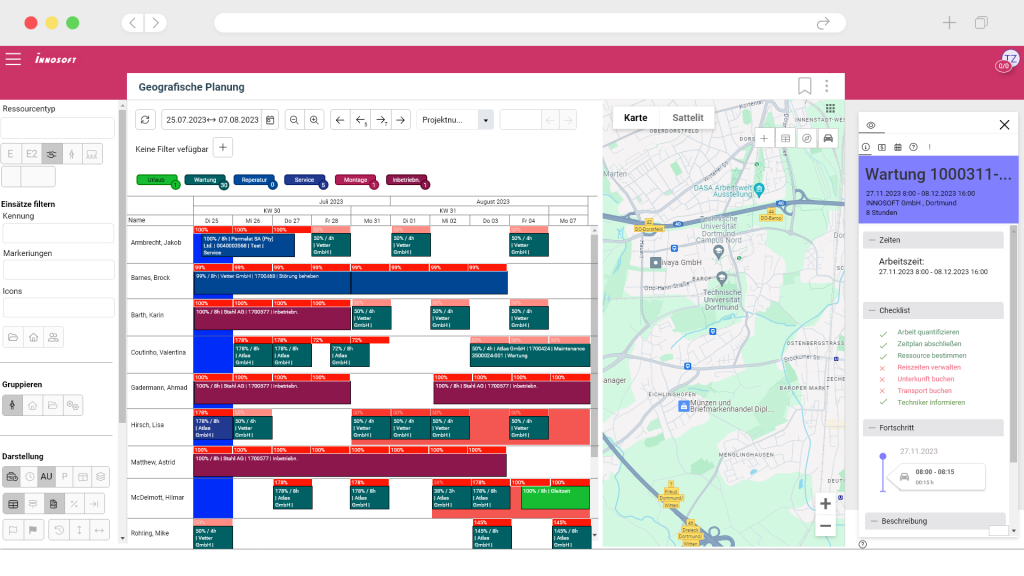
In technical service, work time management and scheduling influence the timing of service calls. Scheduling determines which technician is assigned to a job and when the service call takes place. Work time management provides information on available work hours, absences, and already scheduled assignments.
Scheduling and service management access this data to plan service orders realistically and schedule technicians according to their capacities. At the same time, planned assignment times can be compared with actual documented working hours. This ensures that the timeline of a service assignment remains transparent and traceable.
Integration of Work Time Data – Work Time Management in Day-to-Day Business Operations
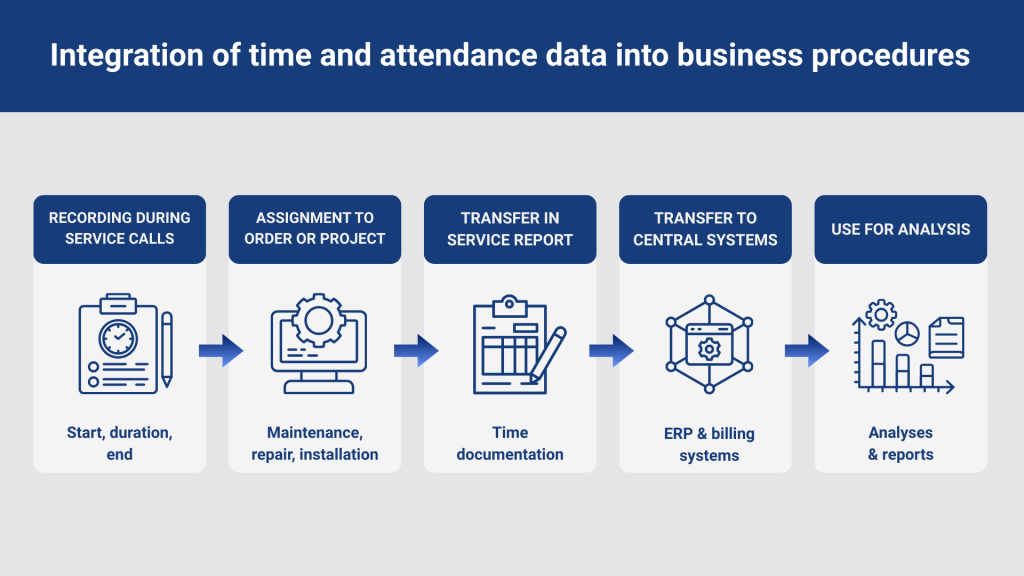
In day-to-day business operations, work time data provides a crucial foundation for various operational processes. Work time management ensures that recorded times are captured in a structured manner and transferred to downstream processes. Particularly in technical service, time data can be assigned to individual jobs or projects and subsequently transferred to other enterprise systems.
The typical process can be simplified as follows:
- Recording of working time during service calls, such as the start, duration, and completion of a call by service technicians
- Assignment of times to service orders or projects, such as maintenance, repair, or installation at the customer’s site
- Transfer of time data to the service report to document the work performed
- Forwarding of working hours to central systems, such as ERP or payroll systems
- Use of time data for evaluations and reports, such as analyzing assignment duration or project times
Work Time Management in Field Service: Requirements for a Suitable System
In technical field service, work time management requires digital systems that capture and process work hours directly within the context of service calls. Solutions such as Innosoft’s FSM software demonstrate how work time data can be integrated into service processes:
- Mobile time tracking: Service technicians document the start of work, duration of the assignment, and completion of a job directly on-site via mobile applications. This allows working hours to be clearly assigned to a service call.
- Assignment to service orders: Time entries are linked to specific orders, projects, or customers. This structure simplifies the documentation of maintenance, repairs, or installations.
- Alignment with scheduling: Time data shows available working hours and scheduled assignments. This enables dispatch and service management to schedule technicians more effectively.
- Integration into service reports: Recorded working hours are directly incorporated into digital service reports. This ensures transparency regarding which tasks were performed at the customer’s site and how long an assignment took.
- Transfer to corporate systems: Working hours can be transferred to ERP systems, payroll, or controlling. Solutions such as Innosoft’s software support this further processing within service processes.
Work Time Management in Technical Service – Solution with Innosoft
In technical service, work time management requires structured recording of working hours in the context of service assignments. Field service management solutions from Innosoft provide a centralized environment for this purpose, in which working hours are directly assigned to service orders and assignment data.
Service technicians document the start of work, duration of the assignment, and completion of an order directly in the system via mobile devices. This ensures transparency regarding the time spent on maintenance, repairs, or installations. At the same time, this time data is available to scheduling, service management, and administration in a shared system overview.
Would you like to learn how work time management can be implemented in field service with Innosoft? We would be happy to show you how work hours can be systematically recorded and integrated into existing service processes.
FAQ on Work Time Management in Field Service
Field service involves various types of time tracking within a single workday. In addition to time spent working at the customer’s site, travel time, preparation time, and on-call time are also recorded. In office-based roles, time tracking typically focuses on start and end times and breaks at a fixed workstation. Time management in field service therefore places greater emphasis on changing work locations and varying tasks within a single service call.
Scheduling determines which technician is assigned to a job and when a service call takes place. Time and attendance management provides information on available working hours, scheduled assignments, and absences. This time data helps the scheduling team assign technicians based on their availability and coordinate service jobs in a way that is realistic in terms of timing.
Master data forms the foundation for the structured processing of working hours. This includes, for example, employee data, work schedules, time types, and premium rules. Based on this information, recorded working hours can be correctly assigned and subsequently used for service reports, analyses, or payroll processes.
Legal requirements mandate the systematic tracking of working hours. Companies must document the start, end, and duration of each day’s work. Mobile time tracking offers a practical solution for field service, as service technicians can record their working hours directly while on the job.
The classification of travel time depends on labor laws, collective bargaining agreements, or company policies. In many service organizations, travel to the work site is documented and recorded separately in the time-tracking system. Whether these times are considered entirely working hours depends on the company’s internal policies.