

A classic Windows solution is increasingly reaching its limits in the day-to-day business of many service organizations. Limited mobility, high administrative costs, and a lack of interfaces are hindering efficient processes. An FSM browser solution provides the basis for modern further development in this area.
Technologies are developing rapidly. With them, expectations for response speed, data availability, and flexible resource planning are also rising. Anyone who wants to set up field service management (FSM) in a future-proof manner needs a solution that keeps pace with these changes.
Web-based control in service: the principle of the FSM browser solution
Classic client applications in the service environment quickly reach their structural limits when it comes to today’s requirements. What is needed is a solution that is significantly more flexible. This is where the modern FSM browser solution comes into play. It is based on a web-based architecture that does not require local installation and can be used anywhere. This technological foundation opens up new possibilities in daily work, both for field staff and for central control authorities. Future viability is evident not only in the type of provision, but above all in the ability to adapt to new conditions. Browser-based solutions offer the necessary flexibility to keep pace with increasing complexity while reducing administrative hurdles.
Two approaches in field service: Innosoft SMS and FSM browser solution in direct comparison
Innosoft’s Windows-based SMS solution has worked reliably in many organizations for years. With the FSM browser solution, a technological advancement based on modern architecture is now available. There are clear differences between the two systems that are relevant for service organizations:
| Aspect | Innosoft Windows Solution SMS | Innosoft FSM Browser Solution |
| Installation | Local client installation required | Browser-based access, no local installation required |
| Updates | Deployment on each device by IT | Central provisioning with simplified, centralized updates |
| Device usage | Designed for stationary Windows environments | Platform-independent |
| Maintenance effort | High administrative and support effort | Reduced administration and support effort through centralized management |
| Further development | Traditional release cycles | Frequent updates with new features at short intervals |
| Operational flexibility | Primarily used in stationary setups | Location-independent, also available offline |
A direct comparison clearly shows that both solutions take different approaches. The specific advantages of the browser solution are explained in more detail in the following sections.
Modernize your technical service with the FSM browser solution
Take advantage of a modern FSM browser solution that provides updates centrally and is available on all devices. Request your no-obligation consultation now.
5 reasons why Innosoft’s FSM browser solution is so impressive
Changing your system platform requires good justification, especially in technical service. Innosoft’s FSM browser solution offers a clear basis for this: less IT effort, flexible everyday use, and regular enhancements based on practical requirements. The following five points show why the switch pays off.
1. IT efficiency thanks to browser-based FSM software
IT departments are under pressure to operate systems that are lean, low-maintenance, and powerful at the same time. Traditional client solutions require a lot of effort, especially when it comes to updates, software distribution, and supporting decentralized teams. Innosoft’s FSM browser solution significantly reduces this effort, as all adjustments are made centrally and no intervention on the end devices is necessary.
Browser-based provisioning has a particularly positive effect on your IT in the following areas:
2. Offline capability and mobility: flexible use of the FSM browser solution on all end devices
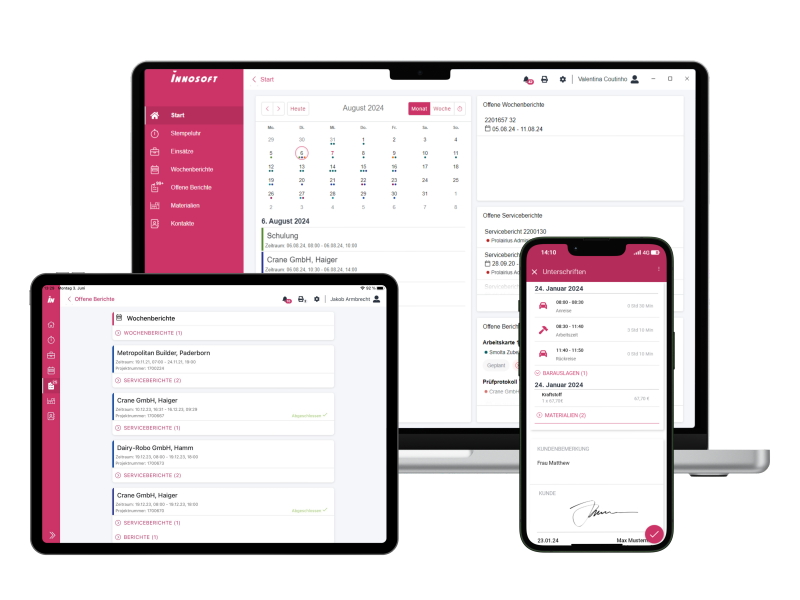
Today’s service processes require access to data from any location. Whether in the office, on the road, or working from home, Innosoft’s FSM browser solution supports a variety of environments and devices:
- Windows
- iOS
- Android
- Tablets and smartphones
The application remains usable even if the Internet connection is unstable or interrupted. Content is stored locally and automatically synchronized when a connection is available, so service teams can continue to work at any time.
3. Continuous updates – the FSM browser solution in everyday work
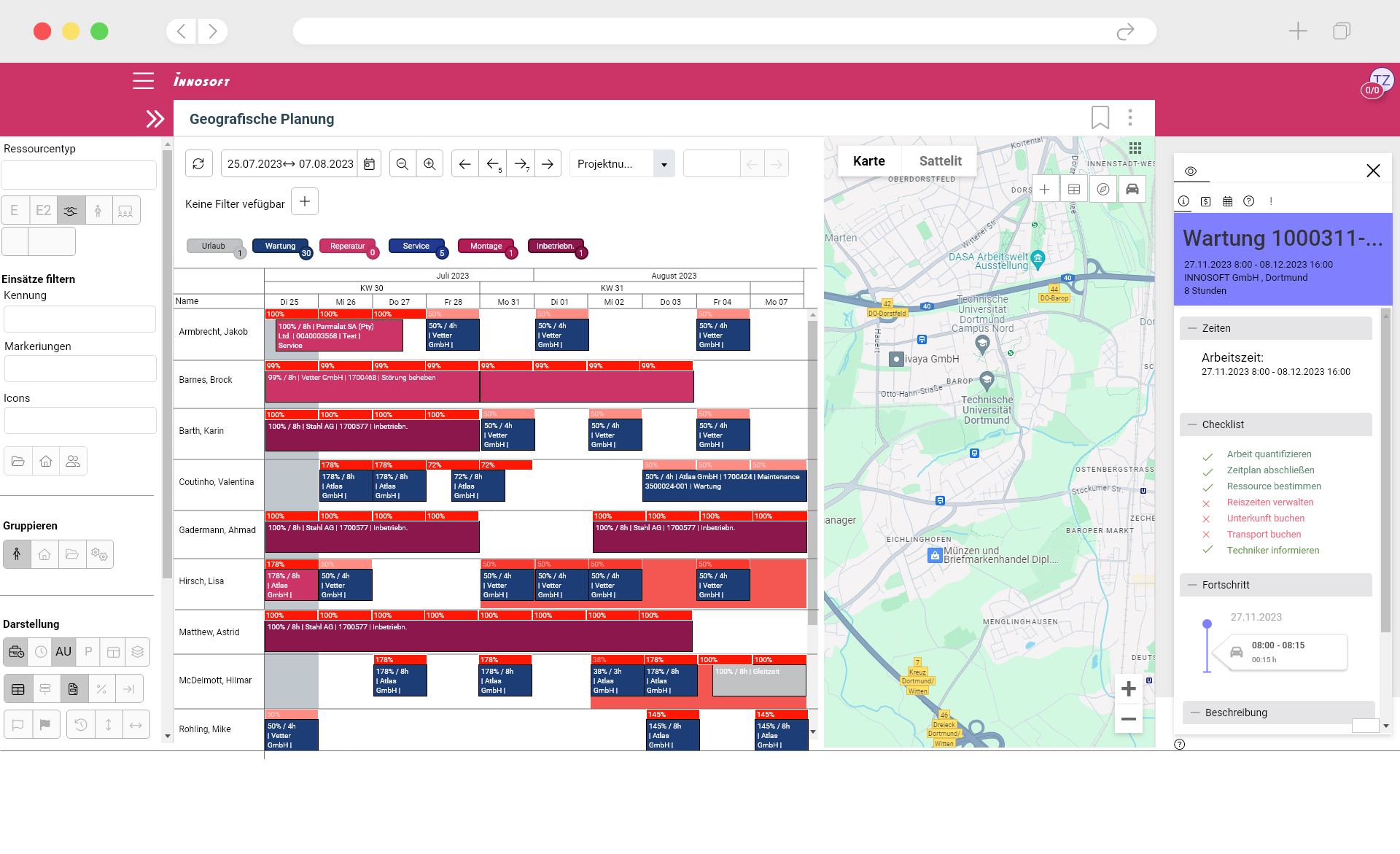
Efficient service processes require tools that go far beyond simple resource planning. Modern organizations need to manage assignments flexibly, provide information at all times, and ensure sound evaluation. Innosoft’s FSM browser solution regularly provides new enhancements that make everyday work much easier.
The application supports service teams in the following areas in particular:
4. Intuitive operation and flexible extensions for service teams
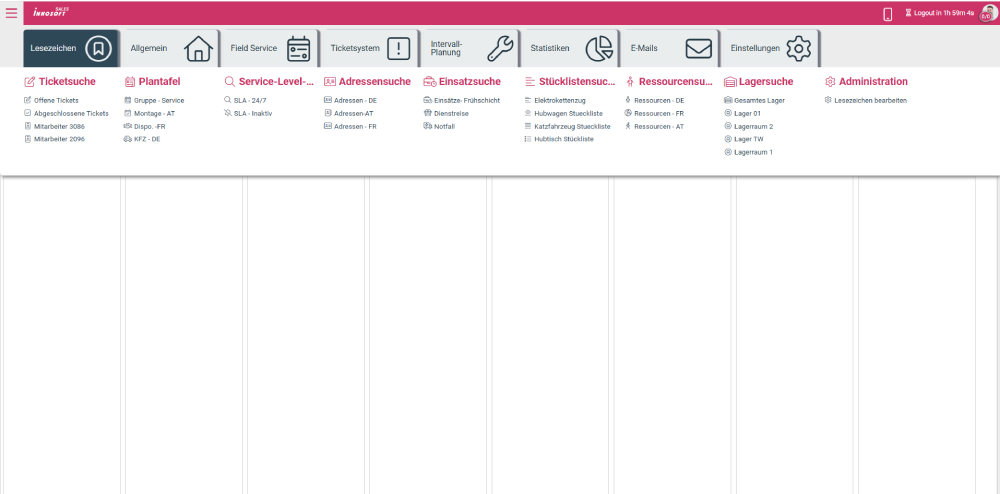
A modern service application must be intuitive and support different ways of working. Innosoft’s FSM browser solution meets these requirements with a clearly structured interface and versatile customization options. These strengths are particularly evident in the following areas:
5. Stable architecture for increasing data volumes and complex processes
A powerful service platform must not only perform well on a day-to-day basis, but also be sustainable in the long term. Innosoft’s FSM browser solution meets high requirements for data security and performance, both in the cloud and in an on-premise environment, where the software is run on the company’s own servers.
The architecture is designed to keep pace with growing organizational structures and reliably process increasing amounts of data. At the same time, the solution remains open to technological developments such as AI-supported analyses or predictive maintenance scenarios. This creates a stable basis that covers current needs and leaves room for future innovations.
Conclusion: Laying the foundation for tomorrow with the FSM browser solution today
Previous systems were primarily designed for stable operation, whereas today factors such as flexibility, scalability, and continuous development are at the forefront. Innosoft’s FSM browser solution addresses these requirements and provides a platform that grows with the needs of service organizations.
A switch creates the conditions for improving existing processes while incorporating future developments. This creates a solid foundation for making the service permanently efficient and future-proof.
Less effort, more service options
Benefit from an FSM browser solution that provides lasting relief for service organizations. Arrange a no-obligation consultation with Innosoft now.
FAQs about Innosoft’s FSM browser solution
FSM stands for Field Service Management and refers to the planning, control, and optimization of service calls in the field. This includes, for example, call and resource planning, mobile support for technicians, and on-site documentation.
FSM software ensures that service processes run more efficiently. It supports scheduling, route optimization, communication with customers, documentation, and evaluation of assignments. The aim is to simplify processes, create transparency, and increase service quality.
An FSM browser solution is based on a web-based architecture. It does not require local installation, is updated centrally, and can be used from various end devices, including mobile and offline.
Innosoft releases new versions every three to four months. This means users regularly benefit from practical enhancements and the latest technologies.